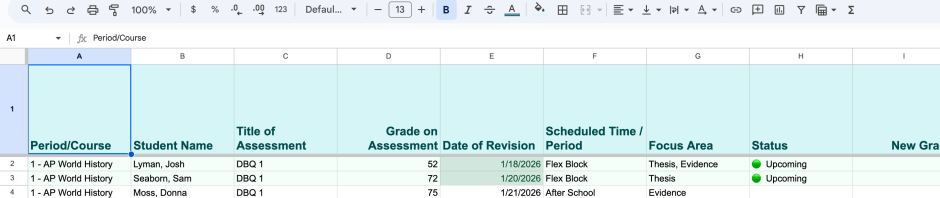
This post documents how a new school revision policy disrupted my classroom workflow and how I built a system to make it manageable. What began as a simple Google Form evolved into a data-driven revision tracker that supports scheduling, reflection, and instructional decision-making. This is not a universal solution, but a record of how one teacher translated policy into practice.
Rain rapped against my classroom windows just enough to make me dread the walk to the car. I had forgotten my umbrella. I did not expect the rain. I also did not expect the day to go like this. It started fine…but by the end I knew that something needed to change. It must have been a Tuesday (I am decidedly not a fan).
This year our school introduced a new revision policy. Students who earned below an 80 percent on a summative assessment and showed evidence of preparation could revise or retake the assessment for a maximum score of 80 percent. There was a reflection form offered by the school for the students to complete and I met with each of them before scheduling a revision. Okay!
On paper, the policy was clear and fair.
In practice, it quietly broke my workflow.
Somehow I had synced my classes perfectly, and on this particular afternoon my room was full of students ready for revisions. I had scheduled them, but my system had evolved into a mess. It started on the backs of the reflection forms. Then it moved to a loose-leaf sheet when I realized flipping through a dozen papers was going to be an issue. Then came the Post-its when students began stopping by at random times to meet with me.
The policy wasn’t the problem.
The meetings were fine. We met. We discussed preparation. We scheduled. But when a classroom full of students arrived at 1:30, I scrambled to get everyone set up. And of course there was one exam hiding in plain sight on a shelf of my brand-new desk organizer, which turned out to be only as good as the person using it. Yes, I’m the problem. It’s me.
When the last student left, I just sat there staring at the stack of papers.
By the time I made my walk to the car that soggy day, I knew that something had to change. I just needed a minute.
Step One: One Small Change
The first change was small.
I needed to capture information in one place. I decided that I would complete a Google Form during my meetings with students.
I thought about the vital information that I needed in order to schedule.
- student name
- course
- assessment
- date of revision
- time or period of revision
Then I thought about the part of the policy I really liked: the reflection. The reflection form had, I think, seven questions for students to complete before or during the meeting, but many got tripped up by parts of it. So I trimmed it down to what I thought mattered most:
- How they prepared
- What worked (or surprised them)
- What they would try differently next time
I folded those reflection prompts into the same Google Form.

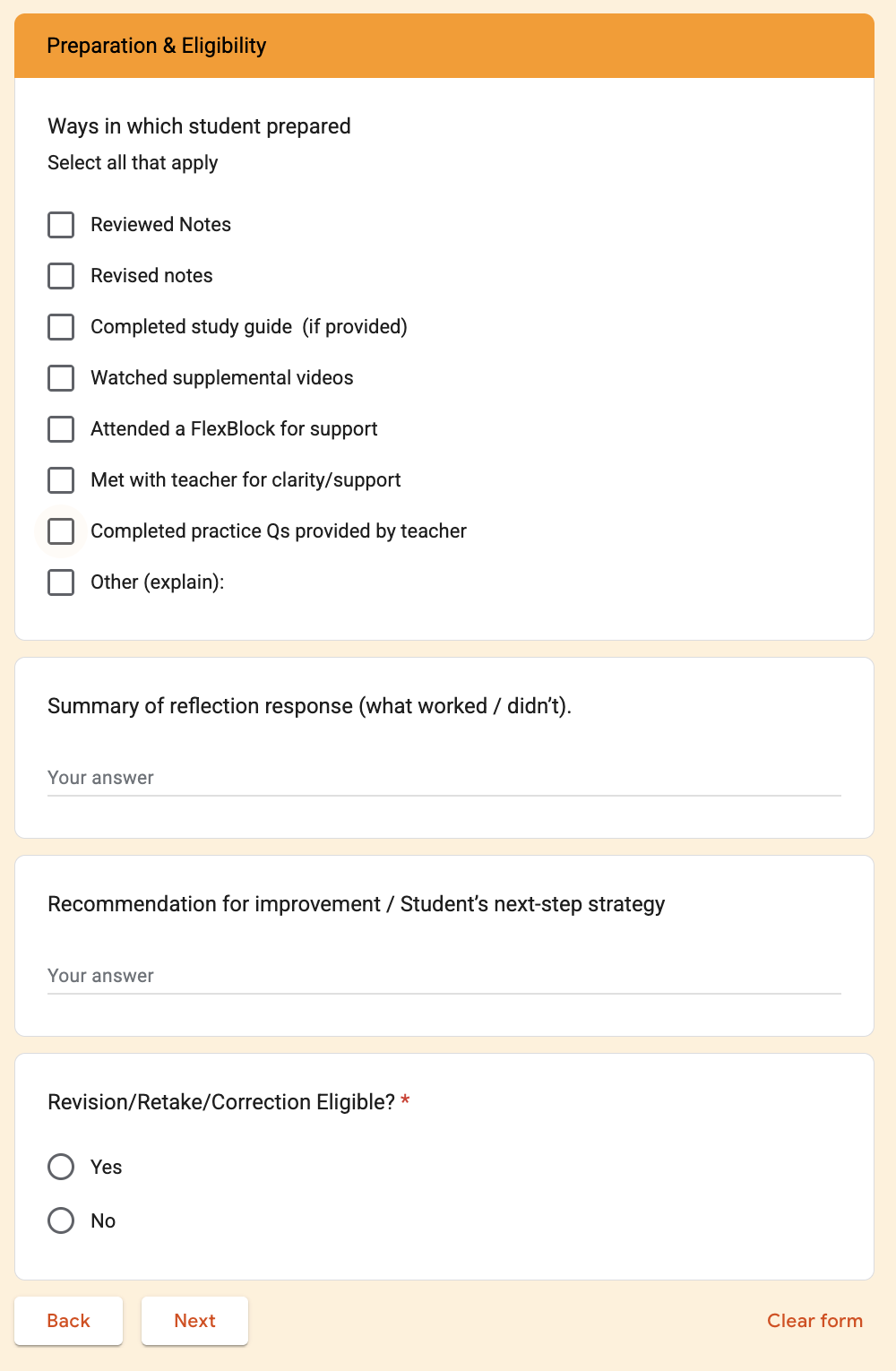
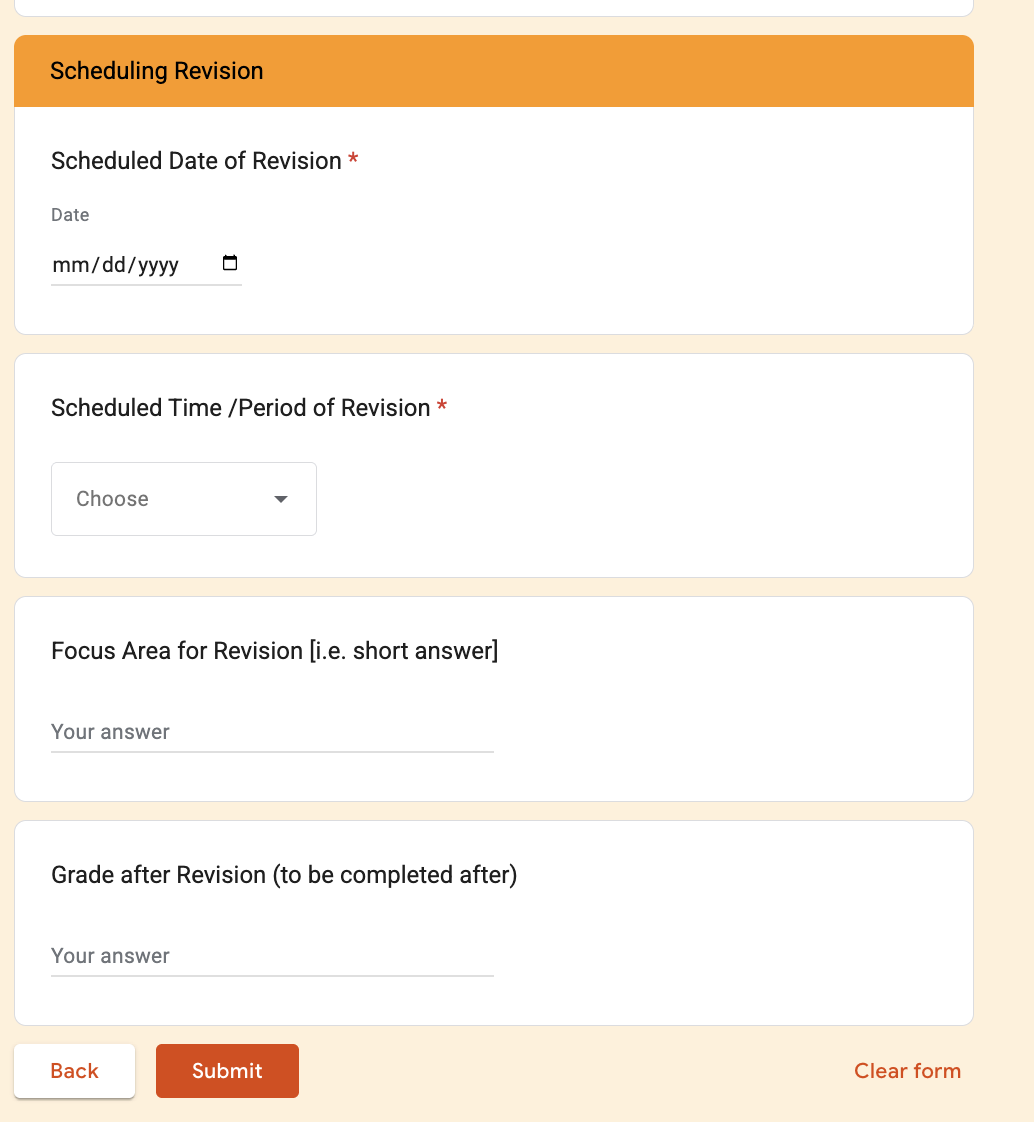
Now the process was simple: students completed their paper reflection, we met, and I captured everything in the form.
And everything now would live in one place.
Step Two: Making the Spreadsheet Work (for me)
The form dumped raw data into a Google Sheet. It was…fine. But I wanted the form to do a bit more. I wanted some zazz.
Now, I have played around with spreadsheets in the past. Years ago, I had a neat system for calculating what students needed in quarter four to pass. This, however, was not going to be as easy. For this, I wanted:
- automatic sorting by date
- color-coding to show who was coming when
- completed revisions to sink to the bottom instead of cluttering the view
I tried Googling but wanted something more specific. So I turned to ChatGPT.
I explained what I wanted the sheet to do. It generated an Apps Script, Google’s built-in scripting language. We are talking coding, people. Over the process, I learned how to make small changes, but this is very much not my area of expertise.
Eventually, the spreadsheet started to behave the way I wanted. That makes it sound easier than it actually was.
There was a lot of trial and error over the first few days. But by the end of the week, the Google Sheet played the way I wanted it to. More or less.
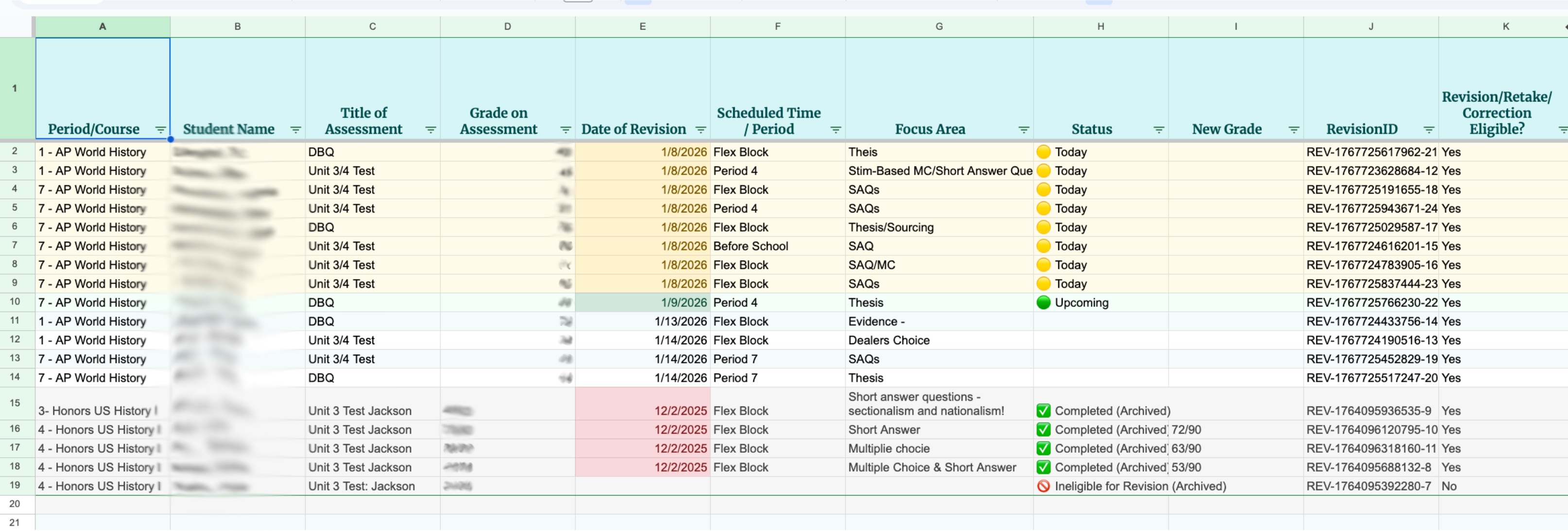
The color-coding made me so very happy.
Green meant upcoming (in a few days).
Yellow meant today.
Red meant the date had passed. Easy.
At that point, I thought I was done. Right?
The Idea the Arrived on a Run
On Saturday, I went on a long run. Just about halfway through the run by the time I hit the reservoir, my mind began to wander.
I started to think about the code and what it did. Then I began to think about the data that I was collecting. The data. (I never quite know the proper way to pronounce data. Dah-tah. Day-tah. Dah-tah! Sometimes I do figure it out only to forget it moments later.)
I realized that I was collecting much more than just logistics, but right now I was leaving it on the table.
I was collecting:
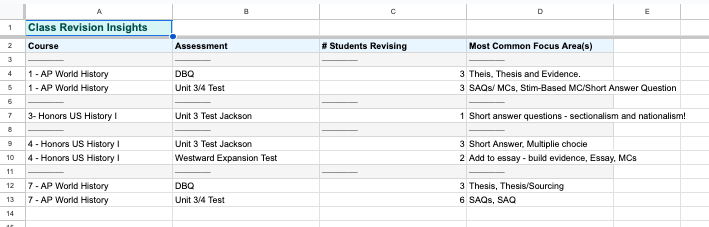
- which assessments generated the most revisions
- which focus areas kept reappearing
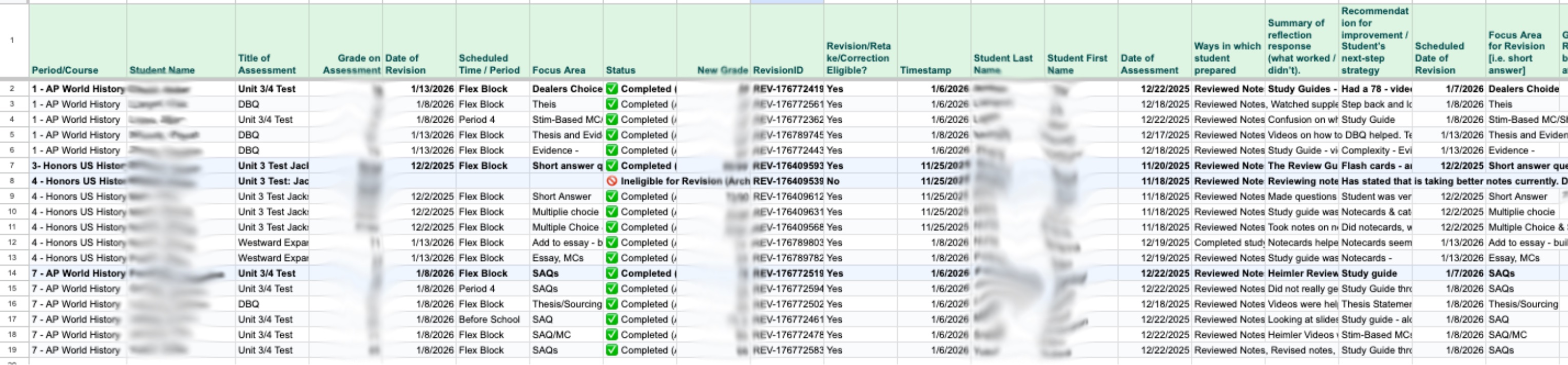
- which students kept returning and why
There’s some good stuff in there!
By the time I got home, I had two new pages sketched in my head: Now to get it out of my head and into the code! I got out a few pieces of paper and sketched out what I wanted. It helps me think.
• Class Revision Insights, showing which assessments and skills were tripping students up. I could use this information for whole-class supports
• Completed/Archive Page, organized by class and student. This information could be used to see student progress and what other individual supports could be needed.
Step Three: Building Out the Revision Manager
For the next few weeks, I talked through what I wanted with ChatGPT. There were many failed attempts. Then moments of stability. Then I tried to break it.
I added fake students. I edited dates. I archived rows. I pushed data around to see what broke and why. Generative AI is very good at encouragement, but you still have to think carefully and explain exactly what you want. Sometimes that meant staring at code and saying, “Okay… what if we did this instead?”
Once the system felt stable, I still didn’t fully trust it.
So I tested it with fake data. Every character from The West Wing became eligible for revisions. Eventually I switched to authors from my bookshelf. In total, I added more than fifty fake entries before letting real student data anywhere near it.
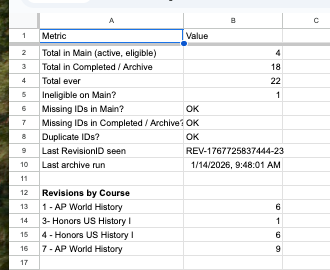
At my wife’s suggestion, I added a Data Control page, an overall tracking page that tracks totals to ensure that nothing disappears and there is at least a log to help identify the issue. Plus you can see a quick view of revisions by course.
Only after all of this then did I feel ready. Although, with no summative assessment on the radar, I waited.
I worked on other projects. I graded. I planned. I taught. I also built a smaller version – Assistant to the Revision Manager – which only does the original task: tracking who’s coming when.
Step Four: Implementation
When the next round of revisions finally came, the difference was immediate. Meetings were smoother. Conversations were focused. And when students returned for a second revision, I could quickly see what we had discussed last time.
On the first Revision Day, I opened the tracker and watched names turn from green to yellow. This was it. I had a folder ready. I wasn’t scrambling. While students worked, I looked at the data to see if there were class-wide supports I could offer before the next assessment.
When policies are introduced, they’re grounded in good intentions. But the day-to-day implications only surface when they are put into action. I will say that my administration did provide supports – the initial reflection form was a great help. But again, teachers are the ones who translate the policies into practice.
This policy absolutely disrupted my workflow. I needed to figure out how to make it work.
There are a hundred ways to manage revision workflows. This one happens to work for me. If I were better with binders or calendars, my solution might look different.
The only thing I need to actively do now is have the revision meeting with the student where I complete the Google Form and mark a revision as complete to move it to the bottom of my main page.
Everything else just… happens. And now, it is taking up less space.
Links & Resources
If you are interested in taking a look or potentially using the Revision Manager – here are the links!
- One Pager Setup Guide If you are interested, I highly recommend starting here. Set up is a bit quirky, but easy.
- Revision Manager Dashboard – the Google Sheet
- Revision Conference Google Form
- Student Reflection Form – the Google Doc
Feel free to look under the hood of the Apps Script – I am absolutely interested if folks can improve it. This tool is tailored to my context, so some adaptation is expected – and may require a few code changes.
Feel free to make a copy. Play around with it. Break it. It might work for you!
(Google just launched AppSheet which looks like a no-code Apps Script. I haven’t messed around with that. But it could have interesting implications.)
Cheers!


 Michael K. Milton: Musings on History & Education (mostly)